Veed
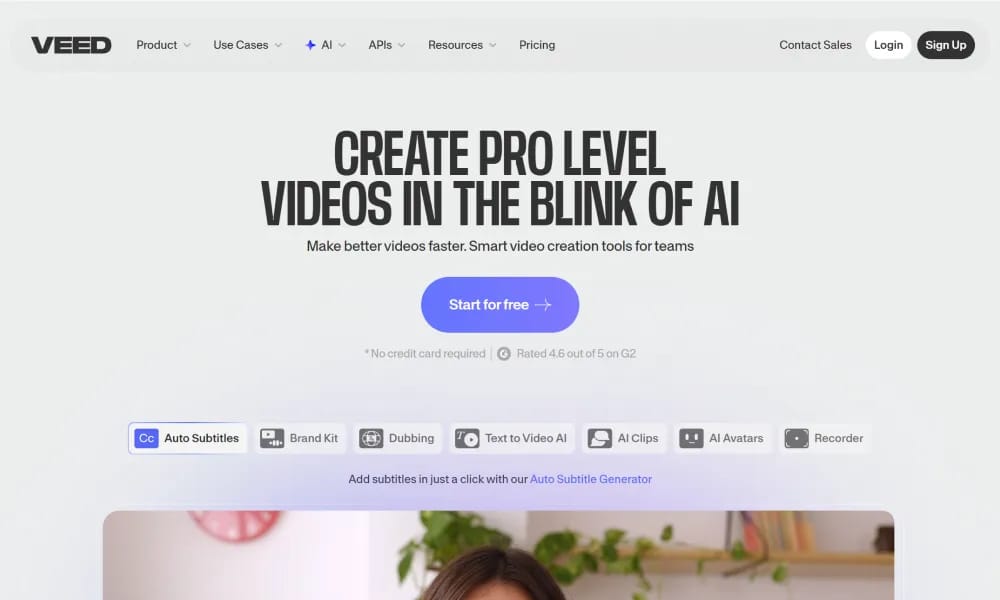
Online AI video editor for fast professional creation and subtitles.
Product Overview
Details and main features: VEED.io is a browser-based AI video editing and creation platform for creators, marketing, L&D, education, and business teams, enabling recording, editing, collaboration, and sharing without downloads; key AI includes auto subtitles generation/translation/styling (100+ languages), AI background removal, AI voiceover/cloning, AI eye contact correction, AI dubbing, filler word removal, Magic Cut (auto highlight clipping), AI avatars, text-to-video, Clean Audio (noise reduction/enhancement); supports screen recording, real-time team collaboration (comments/brand kits/review mode), 2M+ royalty-free stock assets, video hosting/embeddable player; ideal for marketing, internal comms, sales demos, training, social content; trusted by NBCUniversal, Carlsberg, etc., focuses on speed, ease, and pro quality. Main features AI subtitles & translation: Auto generate multilingual subtitles, translate, custom styles. AI editing enhancements: Background remover, eye contact correction, voice cloning, filler removal, Clean Audio. AI generation tools: AI avatars, text-to-video, Magic Cut auto-clipping. Recording & collaboration: Browser screen/camera recording, real-time team editing, brand kits, shareable review links. Other: Stock library, video hosting, HD/4K exports, direct social publishing.
Best For
Best for social media managers, marketing teams, and businesses who need a cloud-based all-in-one video creation platform with AI subtitles, branding, and multi-platform publishing.
Key Features
- Auto subtitle generator with word-level accuracy supporting 100+ languages, multiple caption styles, and snap-to-speech timing alignment
- Browser-based full video editor with drag-and-drop timeline, transitions, filters, text overlays, and B-roll integration requiring no downloads
- Brand kit system that stores logos, colors, fonts, and templates for one-click application across all videos for consistent branding
- AI video generator incorporating multiple models including Google Veo 3.1, Minimax, and PixVerse for text-to-video and image-to-video creation
- Eye contact correction and background noise removal that polish raw webcam recordings to look and sound professionally produced
- Automatic video resizing and reformatting for different social platforms (TikTok, Instagram, YouTube, LinkedIn) from a single source project
Pros
- +Entirely browser-based with zero installation required, enabling video editing from any device with an internet connection
- +Comprehensive all-in-one platform combining AI generation, subtitle translation, screen recording, and collaborative editing in one subscription
- +Brand kit feature ensures visual consistency across team-produced videos, a capability typically found only in enterprise-level tools
Cons
- -Free tier is heavily restricted with watermarked exports, very limited AI credits, and only 10 minutes of subtitle generation per month
- -Browser-based processing means upload and rendering speeds are dependent on internet connection quality and server load
/// SPECS
- Pricing:ProFree
- Platform:Browser
- Free tier available, premium features paid

pixelbin
AI-powered platform for image optimization, transformation, and digital asset management.

CapCut
ByteDance AI video editor for creating pro TikTok/YouTube shorts easily.

Miro
Online collaborative whiteboard platform for team brainstorming and visual collaboration.
EchoWave
Free online audio-to-video editor adding waveforms & subtitles for social sharing.

Tempo
An AI-powered platform for building React apps 10x faster using a visual code editor.

Handwritten Generator
An online tool that instantly converts digital text into realistic handwritten images.
Veeso AI
An AI tool that instantly transforms raw text content into professional, production-ready designs.
Kodo
An AI design tool that transforms text prompts into stunning, fully editable professional layouts.

Paper
Modern powerful canvas tool empowering designers to create, share, and ship beautiful work.

AutoAE
AI motion graphic designer for creating viral animations and hooks instantly.