Handwritten Generator
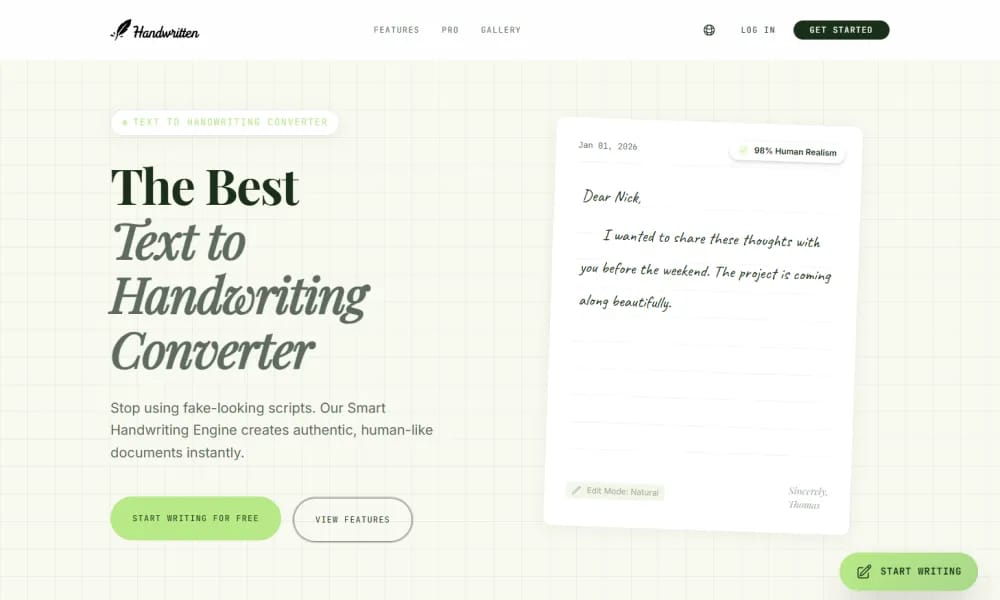
An online tool that instantly converts digital text into realistic handwritten images.
Product Overview
Handwritten Generator is a practical utility designed to eliminate the rigidity of digital text by simulating the human touch. By utilizing a library of diverse handwriting fonts and physical paper textures, it allows users to transform digital notices, letters, assignments, or notes into images that look authentically hand-written, perfect for scenarios requiring personalization. Key Features: Multi-Style Font Selection: Offers a variety of handwriting styles, from neat print to cursive, mimicking different writing habits. Paper & Background Choice: Includes several realistic paper backgrounds (e.g., ruled, grid, or letterhead) with adjustable brightness and texture. Customizable Writing Details: Allows users to fine-tune letter spacing, line height, font color (e.g., black, blue, or red ink), and font size. One-Click Export: High-definition images can be downloaded directly as PNG or JPG for printing or digital sharing.
Best For
Best for educators creating handwritten assignments, designers needing realistic handwritten elements, and professionals generating personalized handwritten notes and letters at scale.
Key Features
- Extensive library of diverse handwriting fonts simulating various handwriting styles from neat cursive to casual scrawl for authentic-looking results
- Physical paper texture overlays including lined, graph, dotted, and blank paper backgrounds that replicate real notebook and document surfaces
- Adjustable writing speed, pressure variation, and ink color parameters that mimic the natural inconsistencies of genuine handwriting
- Batch text processing for generating multiple pages of handwritten content with consistent styling across an entire document
- Export to high-resolution PNG images that can be printed, shared digitally, or used as overlays in design projects and presentations
- Support for multiple languages and special characters, ensuring handwritten-style output works for non-English content and technical notation
Pros
- +Produces highly realistic handwritten outputs that are difficult to distinguish from actual handwriting, unlike basic cursive font generators
- +Paper texture and ink variation features add physical authenticity that makes the output suitable for printing and professional use
- +Batch processing enables efficient generation of multi-page documents with consistent handwriting style throughout
Cons
- -Output quality depends heavily on font selection and parameter tuning; poor settings can produce obviously artificial results
- -Free tier restricts resolution and may include watermarks, limiting professional use without a paid plan
/// SPECS
- Pricing:ProFree
- Platform:Browser
- Free tier available, premium features paid

CapCut
ByteDance AI video editor for creating pro TikTok/YouTube shorts easily.

Miro
Online collaborative whiteboard platform for team brainstorming and visual collaboration.
EchoWave
Free online audio-to-video editor adding waveforms & subtitles for social sharing.

Veed
Online AI video editor for fast professional creation and subtitles.

Tempo
An AI-powered platform for building React apps 10x faster using a visual code editor.
Veeso AI
An AI tool that instantly transforms raw text content into professional, production-ready designs.
Kodo
An AI design tool that transforms text prompts into stunning, fully editable professional layouts.

Notion
All-in-one workspace for notes, docs, wikis, and project management.

Zeplin
Design delivery platform for handoff between designers and developers.

AutoAE
AI motion graphic designer for creating viral animations and hooks instantly.