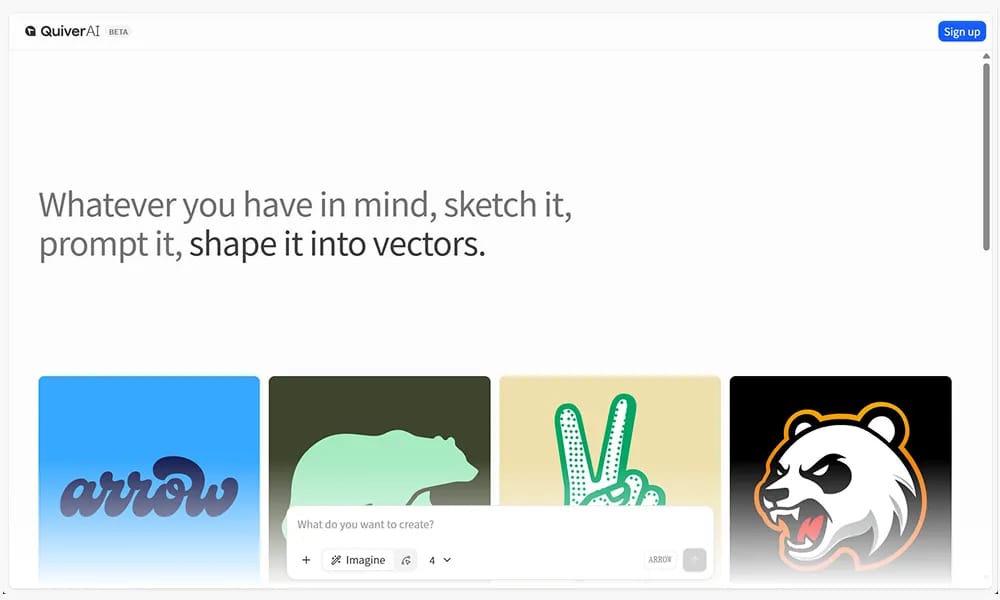
Quiver
An AI creative canvas that transforms sketches and prompts into high-quality vector graphics.
Product Overview
Quiver is an AI-powered design tool specialized in vector graphic generation. It enables users to create professional-grade icons, logos, illustrations, and brand elements through a combination of hand-drawn sketches and text prompts. The platform focuses on "shape control," translating user intent into clean, production-ready vector paths. Key Features: Sketch-to-Vector: Real-time conversion of rough doodles into high-quality vector art with guided structures. Prompt-Driven Creation: Generates visual assets in various styles—ranging from retro scripts and geometric minimalism to pop art—using natural language. Shape & Path Precision: Produces graphics with crisp edges and accurate geometry suitable for logo design and branding systems. Real-time Iteration: Allows users to constantly refine inputs (images or text) on the canvas with instant visual updates from the AI.
Best For
Best for designers, brand managers, and non-designers who need to quickly generate clean, scalable vector graphics including icons, logos, and illustrations from sketches or text prompts.
Key Features
- AI-powered vector graphic generation that transforms hand-drawn sketches and text prompts into professional-grade icons, logos, and illustrations
- Shape control technology that accurately translates user intent into clean vector paths with precise geometry, curves, and anchor points
- Style consistency engine that maintains visual coherence across multiple generated assets for unified brand identity and design systems
- SVG export with clean, editable code that can be further refined in professional vector editing tools like Illustrator and Figma
- Color palette and gradient controls allowing users to define brand colors and apply them consistently across all generated vector graphics
- Iterative refinement workflow that lets users build on generated results by providing additional prompts or sketch refinements for progressive enhancement
Pros
- +Shape control technology produces cleaner vector geometry than pixel-based AI image generators, making outputs practically usable in professional design work
- +Accepts both sketches and text prompts as input, accommodating different creative workflows from freehand drawing to prompt-based generation
- +SVG output with editable paths ensures generated graphics are compatible with existing design tools and workflows without quality degradation
Cons
- -Vector output complexity is currently simpler than what experienced vector artists can produce manually in tools like Illustrator
- -Highly specific or unusual visual concepts may require multiple refinement iterations to achieve the desired result, consuming generation credits
/// SPECS
- Pricing:ProFree
- Platform:Browser
- Free tier available, premium features paid

Pencil
An AI-powered collaborative design canvas that lives directly inside your code editor.
Ppcy
A design curation platform featuring unique visual references and cutting-edge interactive inspiration.
OpenClaw
An open-source personal AI assistant that runs locally and performs tasks via your favorite chat apps.
anirole
An AI platform for real-time anime art generation and immersive character roleplay.

Dreamina
An AI creative suite that transforms prompts and images into high-quality art and videos.
Veeso AI
An AI tool that instantly transforms raw text content into professional, production-ready designs.
Kodo
An AI design tool that transforms text prompts into stunning, fully editable professional layouts.

Pika
AI video generation platform that turns text and images into stunning videos.

Kling
Kuaishou's advanced AI video generation model for creating realistic videos from text and images.
ElevenLabs
AI voice synthesis platform with ultra-realistic text-to-speech and voice cloning.