FocoClipping
FocoClipping is an online tool that utilizes AI for intelligent image cutout and editing.
Product Overview
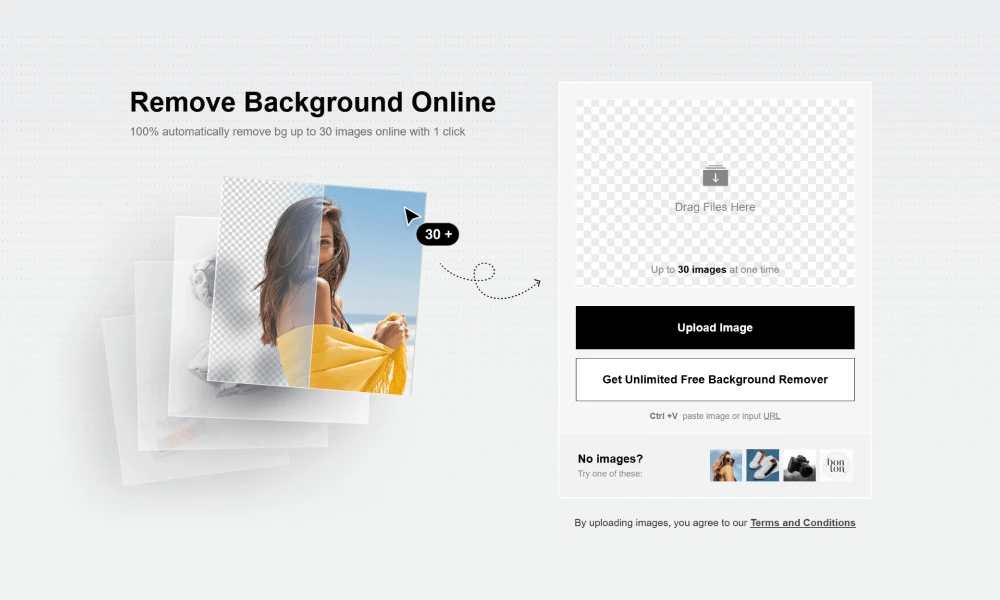
FocoClipping provides a powerful online image processing platform, with its core function being background removal (image cutout) using artificial intelligence technology. Users simply upload an image, and FocoClipping automatically and precisely identifies the subject and removes the background, generating an image with a transparent background. The tool is particularly adept at handling complex edges, such as hair and animal fur, ensuring a natural and smooth cutout effect. In addition to background removal, FocoClipping also offers a range of online image editing features, including: Batch Background Removal: Supports processing multiple images simultaneously to improve work efficiency. Background Replacement: Users can choose solid color backgrounds, image backgrounds, or custom backgrounds to easily replace the background of the cutout image. Image Editing: Provides basic editing functions such as cropping, rotating, adjusting brightness, and contrast. Portrait Beautification: Offers one-click beauty and skin smoothing features specifically for portrait photos. Shadow Generation: Intelligently generates natural shadows for the cutout subject to enhance realism. FocoClipping is suitable for various scenarios such as e-commerce product images, social media avatars, ID photo creation, and creative design. It is a convenient tool that allows users to quickly achieve high-quality image processing results without professional skills.
Best For
E-commerce sellers, photographers, and content creators who need high-volume background removal with additional image editing capabilities.
Key Features
- AI-powered automatic image cutout that precisely identifies and separates subjects from backgrounds
- Batch processing support for handling multiple images simultaneously to save time
- Additional editing tools including color adjustment, cropping, resizing, and filter effects
- High-precision edge detection capable of handling complex subjects like hair, fur, and transparent objects
- Cloud-based processing with no software installation required
- API access available for integration into automated workflows and e-commerce platforms
Pros
- +Excellent cutout accuracy even with challenging subjects like fine hair and translucent materials
- +Batch processing significantly speeds up workflow for large volumes of images
- +All-in-one platform combining background removal with additional image editing features
Cons
- -Free tier has strict daily usage limits that may be insufficient for heavy users
- -Processing speed can be inconsistent depending on cloud server load
/// SPECS
- Pricing:ProFree
- Free tier available, premium features paid

Experte Background Remover
Experte.com offers a free online tool for automatically removing image backgrounds.

RestorePhotos
RestorePhotos.io offers a free online photo restoration service, utilizing AI technology to intelligently repair old photographs, enhancing image quality and details.
StoryTribe
A free online storyboard maker that allows creating professional illustrations and storyboards without drawing skills.

Upscayl
Upscayl is a free and open-source desktop application that uses AI to losslessly upscale and enhance the quality of low-resolution images.

Palette
Palette.fm is an online tool that uses artificial intelligence to automatically colorize black and white photographs.

ImgUpscaler
ImgUpscaler is an online AI tool for losslessly upscaling images and enhancing their quality.

TinyWow
TinyWow offers a large collection of free online tools, covering PDF, image, video, and other file processing functions.

Nano Banana
Nano Banana is an AI-powered image generation and editing tool developed by Google, built on the Gemini 2.5 Flash model.

Google Labs Whisk
Google Whisk is an experimental AI tool from Google Labs.

PicWish
PicWish is a powerful online image processing tool, offering services like background removal, image retouching, and enhancement, empowering users to easily edit pictures.