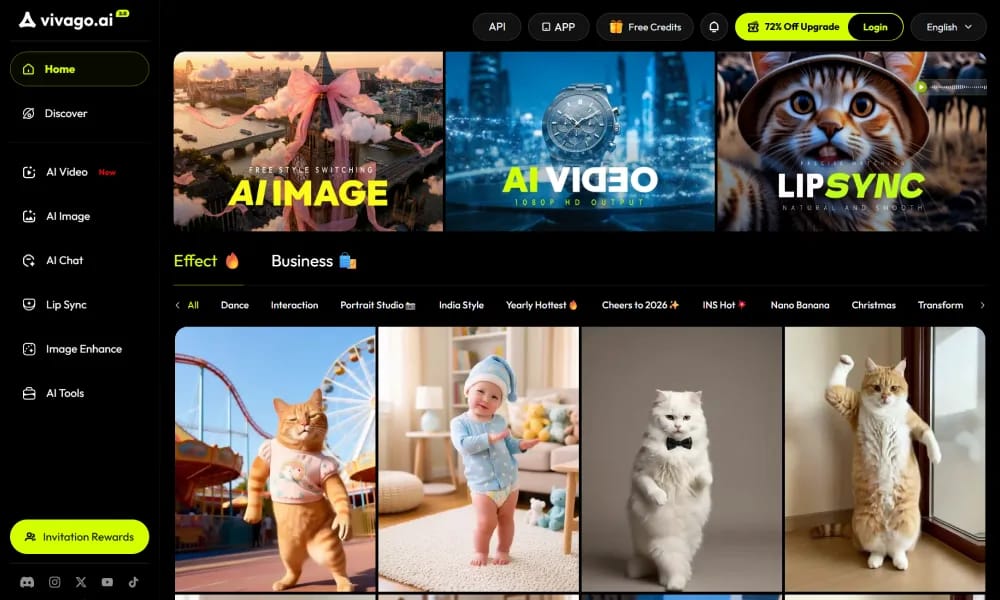
Vivago.ai
Free AI platform for image & video generation with text/image prompts and 4K editing.
Product Overview
Details and main features: Vivago.ai (vivago.ai) is a free online AI visual creation tool and community platform offering text-to-image, image-to-image, text-to-video, image-to-video generation, plus powerful editing tools (image expand/repaint/object removal/addition/background swap, 4K upscaling); users input text prompts or upload images to quickly create high-quality videos (cinematic motion, realistic details, styles like anime/realistic/retro), images, and 3D models; includes Magic Brush (precise area editing), AI Replace (element swap), Magic Expand (smart canvas extension), video HD enhancement, keyframe generation, vertical video support, AI effect templates (pet dance/character transform/memory revival/trendy figurine etc.); supports real-time preview, batch processing, Discord quick start, Vision Pro experience; focuses on ease (no skills needed), high-quality output (4K+), trend-sync updates, community sharing; suitable for marketing, education, art, social media, ads, personal creativity; available on iOS/Android apps. Main features Text-to-video: Describe to generate dynamic videos with camera & storytelling. Image-to-video: Animate static photos with natural motion & effects. AI image generation & editing: Text/image to high-res art, Magic Brush/Replace/Expand, object removal. Video enhancement: Import blurry videos, AI fixes noise/colors to 4K. Other: Popular templates (pet dance/transform/memory revival), effect filters, community exploration, instant browser + app access.
Best For
Best for hobbyist designers, social media content creators, and budget-conscious users who want free access to comprehensive AI image and video generation with editing tools.
Key Features
- Free AI visual creation platform offering text-to-image, image-to-image, text-to-video, and image-to-video generation from a single interface
- Image expand and repaint tools that extend canvas boundaries and intelligently fill new areas with context-aware content
- Object removal and addition capabilities for precise photo editing without requiring Photoshop-level skills
- Background swap feature with AI-powered subject detection for instant scene replacement in portraits and product photos
- 4K AI upscaling that enhances low-resolution images while preserving detail and reducing artifacts
- Built-in community platform where users can share creations, explore others' work, and find inspiration for their own projects
Pros
- +Completely free with a generous feature set that rivals paid tools, making professional-grade AI editing accessible to everyone
- +Context-aware editing tools like image expand and repaint are genuinely useful and implemented as well as premium alternatives
- +Community aspect adds discoverability and inspiration, turning it into more than just a tool but a creative ecosystem
Cons
- -Generation speed during peak hours can be slow due to free-tier server demand and limited computational resources
- -Image quality, while good, does not consistently match the output of dedicated premium generators like Midjourney or DALL-E 3
/// SPECS
- Pricing:ProFree
- Platform:Browser
- Free tier available, premium features paid

ToMoviee
All-in-one AI creative studio for generating videos, images, voice & sound effects.

Vidful
Free online AI video generator turning text or images into high-quality videos.

Funy Ai
Free uncensored AI platform for video/image generation with fun effects & editing.
VideoTube
Free AI platform for generating viral shorts and videos from text/images.
SubEasy
AI transcription & subtitle platform for fast, accurate audio/video captions & translation.

Morphic
AI storytelling platform generating images, animations, and sound with breakthrough tech.

Media
Online AI multimedia platform for enhancing video, audio, image & PDF.

lumen5
AI video maker turning text/articles into professional social videos quickly.

Topazlabs
AI platform for enhancing photos and videos with denoising, sharpening, and upscaling.

CrePal
AI video creation agent turning prompts into complete multi-scene short films.