Diffusion Studio Pro
Browser-based AI-powered professional video editor with automation.
Product Overview
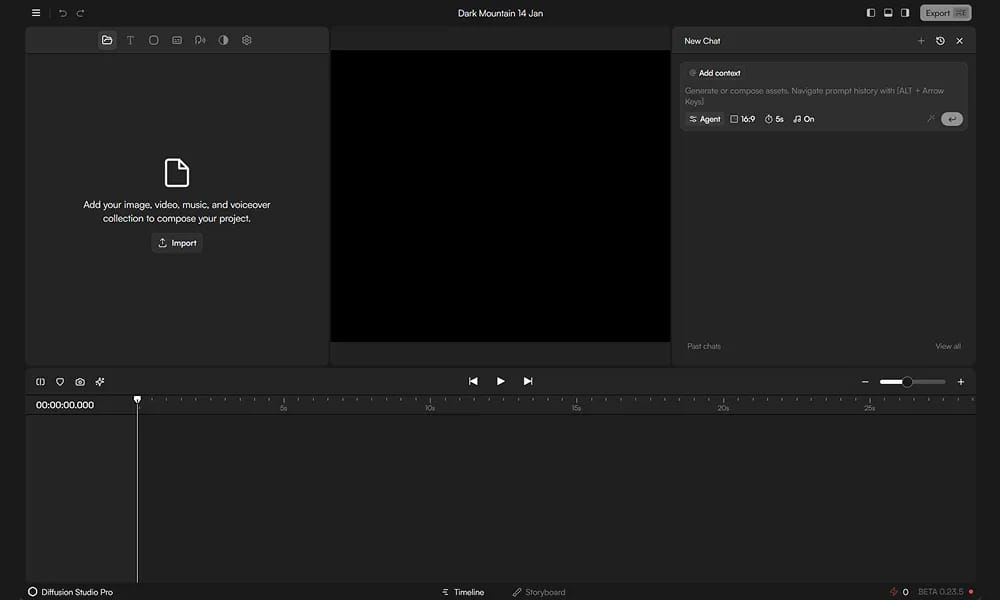
Details and main features: Diffusion Studio Pro (pro.diffusion.studio) is a browser-based AI-enhanced video editing platform functioning as a professional non-linear editor (NLE), leveraging WebCodecs and WebGPU for smooth performance without installation; enables editing, translation, captioning, and exporting directly in the browser; automates repetitive tasks with AI like chat-based editing, AI B-roll generation, text-to-speech voiceovers, auto-captions, filler word removal, shot enhancement; supports real-time preview, collaboration, 4K 60fps export; ideal for content creators, marketers, and pro editors, focusing on speed, privacy (some local processing), and ease; integrates various AI models for video understanding, generation, and editing. Main features AI chat editing: Edit videos via natural language prompts (e.g., remove silence, add effects). Auto captions & translation: AI-generated subtitles with multi-language support. B-roll & voice generation: Automatic insertion of clips, text-to-speech for voiceovers. High-performance export: 4K 60fps, no install, multiple formats (MP4/WebM). Other: Drag-and-drop editing, real-time collaboration, AI prompt guidance, pro toolkit (smarter/faster sibling to CapCut + Cursor).
Best For
Best for video editors, content teams, and localization professionals who want a browser-based professional NLE with built-in AI translation and captioning.
Key Features
- Browser-based professional non-linear editor with multi-track timeline supporting video, audio, text, and effect layers
- AI-powered auto-captioning with speech recognition for generating timed subtitles in multiple languages
- Built-in video translation capabilities that automatically dub and subtitle content into different languages
- Hardware-accelerated rendering using WebCodecs and WebGPU for smooth performance without local software installation
- AI-driven scene detection and automated clip segmentation for efficient editing of long recordings
- Real-time collaboration features allowing multiple editors to work on the same project simultaneously through browser sharing
Pros
- +No installation required yet delivers near-native performance via WebGPU and WebCodecs hardware acceleration
- +AI translation and captioning features make it a strong choice for multilingual content production teams
- +Subscription-free pricing model with usage-based options offers flexibility compared to traditional NLE licensing
Cons
- -Browser-based architecture depends on stable high-speed internet for optimal performance and asset loading
- -Plugin ecosystem and third-party integrations are significantly smaller than established desktop NLEs like Premiere or DaVinci
/// SPECS
- Pricing:ProFree
- Platform:Browser
- Free tier available, premium features paid

RunwayML
: Leading AI platform for cinematic video and image generation with pro controls.

Flow
AI filmmaking tool for creatives to generate cinematic clips, scenes, and stories.

LTX Studio
All-in-one AI platform for end-to-end video production from script to final edit.

Luma AI
AI video generator creating cinematic clips from text or images quickly.

MagicHour
Free online AI platform for generating videos and images with 100+ tools.

Adobe Podcast
AI-powered web tool for recording and editing pro podcast/voiceover audio.

Quso
AI tool turning long videos into viral shorts with social media scheduling.
EaseUS Fixo
Online AI tool to quickly repair corrupted MP4/MOV and other video files.

Sparkify
AI experimental tool turning questions or ideas into animated explainer short videos.

Stability AI
Open-source generative AI platform for high-quality image, video, and audio creation.